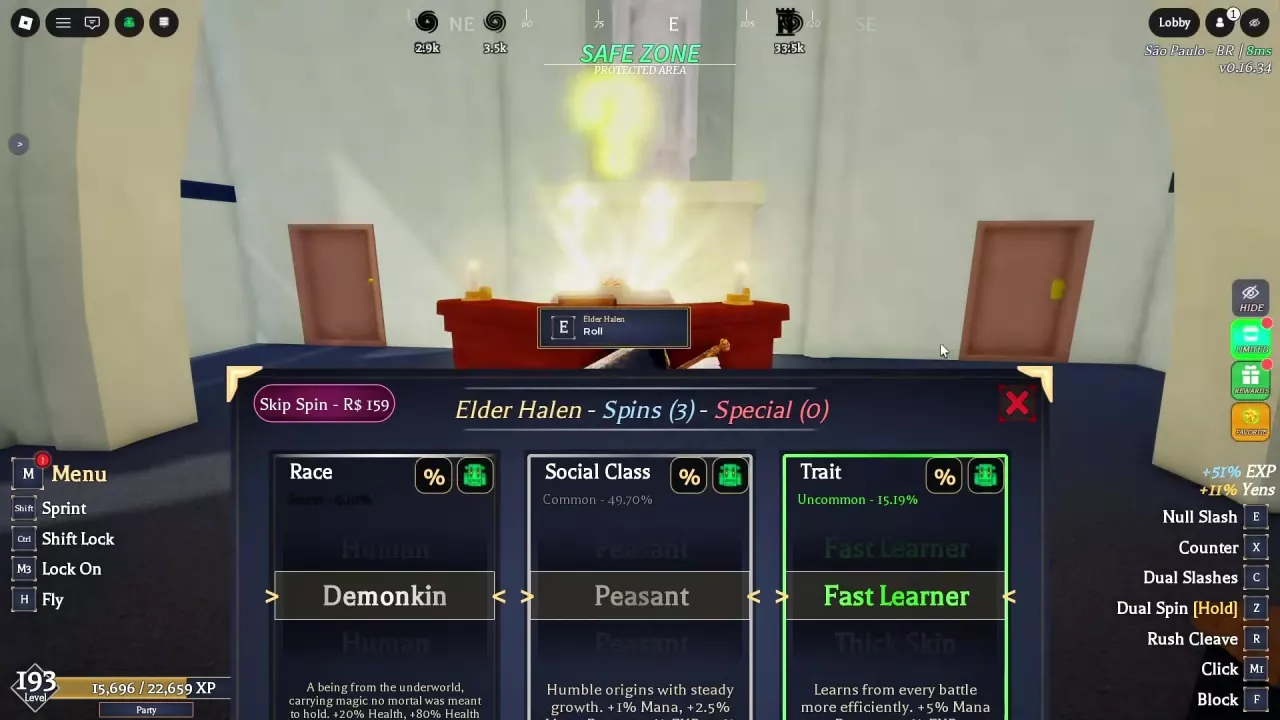
For a race reroll, approach Elder Halen in the safe zone and press E at the Roll prompt. Choose Race, Social Class or Trait and use its Roll control. Keep or choose Elf for Battle Lightning Awakening; Demonkin is part of a successful relaunch-version Devil Union setup. Find Spins in Daily Rewards and AFK World, and use Lobby → Customize to edit your appearance.
Cloverlines Race Rerolls, Traits and Character Customization
Last updated:
Choose a race for your awakening goal, change your character background at Elder Halen, and adjust your appearance in Cloverlines.
Race, Social Class and Trait Reference
Elf characters have pointed ears and meet the race requirement for Battle Lightning Awakening. Demonkin pairs with Null (Anti-Magic) in a successful Devil Union setup from the relaunch version.
The Roll interface labels Peasant as Common — 49.7% and Fast Learner as Uncommon — 15.19%. These percentages are the displayed rarity labels.
Choose a Race for Your Awakening Goal
- Battle Lightning Awakening: Choose or keep Elf. You also need Battle Lightning equipped and a full awakening gauge; press G when the awakening prompt appears. See the Battle Lightning guide for its moves and Overvolt setup.
- Devil Union: Demonkin and Null (Anti-Magic) form a successful relaunch-version setup. When the HUD offers Devil Union, hold G to activate it. See the Devil Union guide for its controls and form management.
Reroll at Elder Halen
- Approach Elder Halen in the safe zone and press E at the Roll prompt.
- Find the Race, Social Class or Trait category you want to change.
- Use that category's Roll control with the required spin resource available.
The interface also offers Get Special for Special Spins and Skip Spin for 159 Robux. The three background categories also appear under Rolls in Character Customization.
Normal Spins and Special Spins
Normal Spins are used for character background rerolls. To find them, open Rewards → Daily from the right side of the game interface, or enter AFK from the Lobby. For more on these menus, see Rewards and AFK World.
Special Spins are a separate resource usable for Race rolls at Elder Halen. If you are aiming for Elf, use Special Spins for a higher chance of that target race. The Get Special control in Character Customization opens the Special Spins acquisition menu.
Edit Appearance in Character Customization
- From the Lobby, select Customize.
- Open the appearance controls and choose your Eyes, Nose and Mouth styles.
- Adjust the available colors and sliders, then select Complete to enter or return to the game.
The Rolls section handles Race, Social Class and Trait separately from the appearance controls.